
Website Speed Optimization Techniques That Improve Rankings
Karl Marais | 8 April 2026
A slow website is like a store with a locked door: fewer people get in, and you lose opportunities. Even small delays can reduce conversions and harm user experience.
Website speed plays a direct role in how Google ranks your site through page experience signals, making performance optimization essential.
Here’s a practical guide to boosting your website’s speed, user experience, and Google rankings.
Importance of Website Speed for SEO
Website speed is crucial for both Google’s standards and user satisfaction. Fast load times improve user experience, which can lead to better engagement and conversion outcomes.
Users expect near-instant loading; if they are disappointed, they leave, hurting both your conversion rates and revenue.
Search engines weigh page experience signals, rewarding faster sites with better search visibility. Ultimately, speed optimization enhances both user experience (UX) and organic rankings.
How Speed Impacts Google Rankings
Google incorporates speed into its ranking systems through page experience signals, especially following the page experience update.
Core Web Vitals, like load times and visual stability, help influence rankings. A fast site can lead to better engagement signals.
Quick-loading sites also help Google crawl more pages, boosting your search visibility. With mobile-first indexing now standard, mobile speed remains especially important.
User Experience and Conversion Rate
Slow sites can increase bounce rates and erode user trust. Pages that load quickly foster satisfaction, increased engagement, and better conversions.
In short, investing in speed is a proven strategy for strong brand perception and long-term success.
Measuring Your Website Speed
Measuring site speed reveals issues that cost you visitors and revenue. Website speed tests help you identify bottlenecks and set a baseline for improvements.
Essential Tools for Speed Testing
- Google PageSpeed Insights: Get lab and real-user metrics.
- GTmetrix & WebPageTest: Deep-dives into site performance, with actionable recommendations.
- Lighthouse and Chrome DevTools: Analyze technical details using lab data and controlled testing.
- Chrome User Experience Report (CrUX): Offers real user interaction data.
Using these tools together provides a full picture of your performance.
Key Metrics: LCP, INP, and CLS
- LCP (Largest Contentful Paint): Measures how quickly the main content loads.
- INP (Interaction to Next Paint): Captures how soon your site responds to user inputs.
- CLS (Cumulative Layout Shift): Tracks unexpected visual shifts during load.
Optimizing these metrics boosts user satisfaction and your ranking potential. Familiarize yourself with recommended thresholds for each metric to guide your optimization efforts.
Core Web Vitals: Foundations of Speed Optimization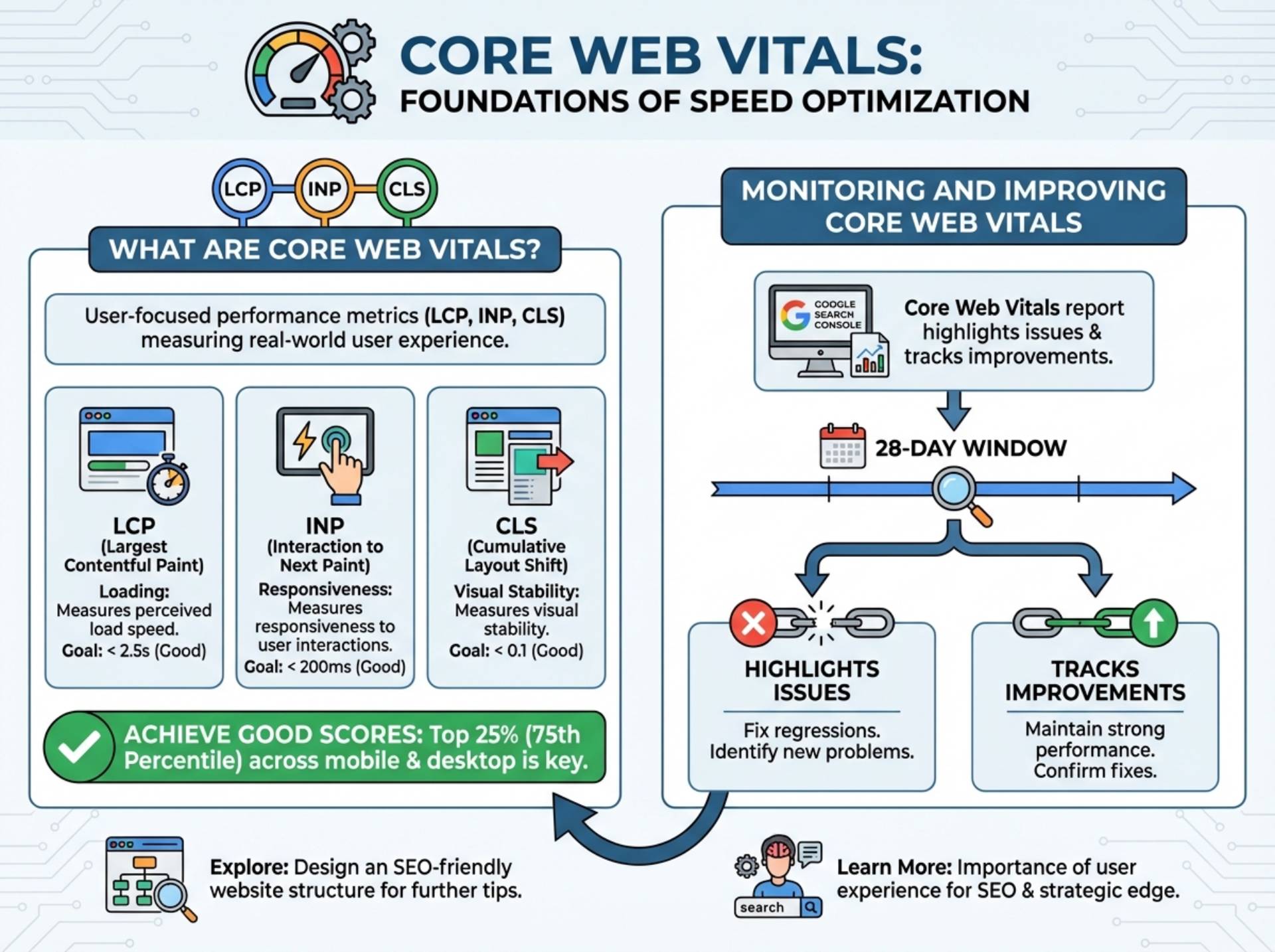
What Are Core Web Vitals?
Core Web Vitals are user-focused performance metrics: LCP, INP, and CLS. They measure real-world user experience in loading, responsiveness, and visual stability.
Achieving good scores, especially in the top 25% (75th percentile) across mobile and desktop, matters for performance and visibility. Learn how to design an SEO-friendly website structure for further practical tips.
Monitoring and Improving Core Web Vitals
Google Search Console’s Core Web Vitals report highlights issues and tracks improvements over a 28-day window. Consistent monitoring helps you fix regressions and maintain strong performance.
Learn more about the importance of user experience for SEO and how it can give you a strategic edge.
Image Optimization Techniques
Images can make or break your site speed. Smart optimization reduces load times and directly impacts search performance.
Choosing the Right Image Formats
Next-gen formats like WebP and AVIF offer smaller file sizes with minimal quality loss. Using the picture element with fallbacks ensures compatibility and improves LCP.
Lazy Loading and Responsive Images
- Use loading=”lazy” for below-the-fold images to load only when needed.
- Add srcset and sizes for responsive images that adapt to device widths.
Compression Tools and Image Delivery
Tools like TinyPNG, Squoosh, or ImageOptim compress images effectively. WordPress plugins (ShortPixel, Imagify) automate the process. An image CDN speeds globally, reducing latency.
Server and Hosting Optimization
Your server and hosting setup underpin site speed; don’t overlook these fundamentals.
The Role of TTFB
Time to First Byte (TTFB) measures how fast servers start delivering content. Optimize databases, reduce query times, and use server-level caching for fast responses.
Choosing Fast, Reliable Hosting
VPS, managed WordPress hosting, or cloud hosting outpace basic shared hosting. Server-level caching boosts performance.
Benefits of a Content Delivery Network (CDN)
A CDN caches static content worldwide, minimizes latency, and accelerates load times, especially for global audiences. Options like Cloudflare deliver scalable, reliable results.
Front-End Code Optimization
Efficient code accelerates site speed, key for users and search engines alike.
Minifying CSS, JS, and HTML
Reduce file sizes by removing unnecessary whitespace and comments. Tools like Autoptimize and WP Rocket automate this and support code concatenation.
Deferring Non-Critical Scripts
Apply defer or async to non-critical scripts to ensure above-the-fold content loads first and minimizes render-blocking.
Reducing Total Blocking Time (TBT)
Code splitting (dynamic imports, tree shaking) breaks large files into smaller chunks. Tools like Webpack Bundle Analyzer help spot bottlenecks.
Advanced Techniques for Boosting Page Speed
Once basics are covered, advanced tactics further elevate performance.
Browser Caching
Set cache headers such as Cache-Control and max-age so that repeat visitors load static elements from their devices, not your server.
Enabling Gzip or Brotli Compression
Enable these at the server level to compress text-based assets, delivering content faster with smaller files.
HTTP/2 and HTTP/3 Support
Adopt modern protocols to enable concurrent connections and reduce latency. HTTP/2 multiplexes data, while HTTP/3’s QUIC protocol improves stability.
Monitoring and Continuous Improvement
Speed isn’t a one-time fix. Continuous monitoring prevents regressions and keeps performance tight.
Implement performance budgets to set clear targets for load time, response, and resource size. Integrate checks into CI/CD pipelines to catch issues before they go live. Consider professional guidance for expert help.
Setting Up Real User Monitoring (RUM)
RUM tools like the web-vitals library, Google Analytics 4, and Vercel Analytics reveal how real visitors experience your site. Use CrUX data to spot trends and quickly fix issues.
Performance Management Tools
Tools like Lighthouse CI, synthetic monitoring, and Google Search Console can automate checks and alert you to regressions. Regular performance audits maintain site health and support both SEO and user engagement.
Conclusion
Website speed is no longer a technical afterthought. It directly affects user experience, search visibility, and your ability to convert traffic into results. From Core Web Vitals to hosting, images, and front-end code, each element plays a role in overall performance.
The most effective approach is consistent improvement. Monitor performance, address bottlenecks, and refine over time.
Sites that prioritize speed create smoother user journeys, maintain stronger search visibility, and build a reliable foundation for sustained growth.